Animal Jam
- 4.1
- Rating
- 10.00M
- Installs
- Free
- Price

 Analysis by App-foxy
Animal Jam is an educational game that feels more like a colorful online world than a traditional lesson app. I found the appeal quickly: you choose an animal, adjust its appearance, and begin exploring a space built around customization, creation, and roleplay. That combination makes the first few minutes approachable, especially for a child who may lose interest in a worksheet-style learning game.
It is free to download, rated for Everyone, and developed by WildWorks. The game has been available since December 7, 2015, and its Android version currently appears as 118.0.15, with Android 6.0 or later required. Its 4.1 average from around 529 thousand ratings and more than 10 million installs suggest that it has built a large, lasting audience rather than being a short-lived novelty.
What the first visit to Animal Jam feels like
The best way to understand the game is to think of it as a playful animal-themed social playground. The educational side is not presented as a sequence of formal classes. Instead, learning is mixed into exploration, collecting, creative decisions, and interaction with the world. I would recommend approaching it as a guided activity with game elements, not as a replacement for a dedicated reading, mathematics, or language-learning app.
You May Also Like

 Blood Strike: 2.5 Anniversary
Blood Strike’s Loadouts Turn Every Drop Into a Tactical Gamble
A close look at Blood Strike’s custom loadouts: how fast access to signature weapons reshapes its battle royale rhythm, rewards preparation, and narrows the gap between fights.

 Pandora - Music & Podcasts
Pandora’s Music Is Easy to Start, but Harder to Recover
Pandora’s strength is its low-effort path from a seed to a station. Its weak spot is how much confidence it asks you to place in connection, setup, and quiet recovery.

 8 Ball Pool
 Is Built on Rivalries, Rematches, and Routine
A close look at the rivalries, rematches, shared routines, and unanswered safety questions that turn a quick pool match into a persistent mobile community.

 Samsung Music
’s Quiet Strength Is Playing What You Already Own
Its reach comes less from spectacle than from dependable access to a personal library. That simplicity is both the app’s strongest retention engine and its ceiling.

 AccuWeather: Weather Radar
AccuWeather Review: A Quick, Clear Forecast for Everyday Decisions
For everyday plans, the best forecast is the one you can understand quickly. AccuWeather makes rain timing, radar, and local conditions easy to act on, with a few trade-offs.

 Hill Climb Racing
Why Hill Climb Racing Still Turns Crashes Into One More Run
A tiny car, a bumpy hill and one more upgrade: Hill Climb Racing keeps resurfacing because its simple chaos makes every near-miss feel personal.
More From Our News Desk



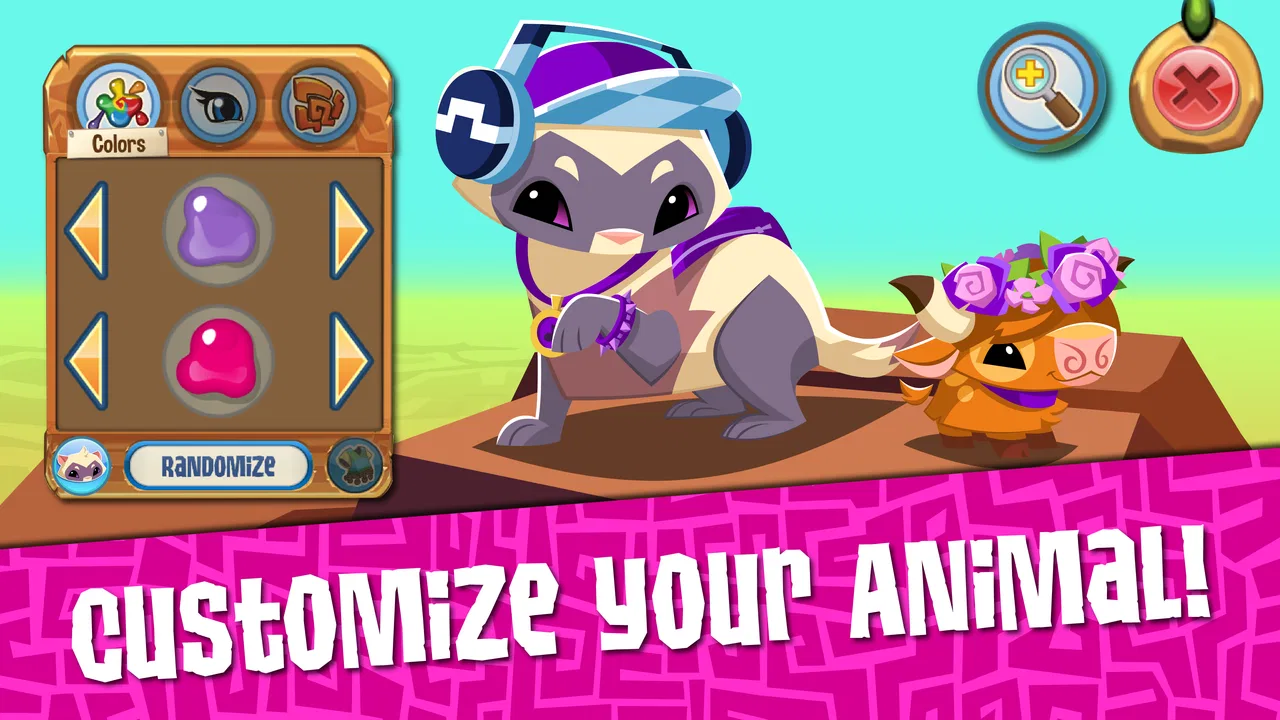
The opening experience is centered on making the game feel personal. Choosing an animal and changing its look gives a new player an immediate sense of ownership. That first decision matters more emotionally than mechanically: children often engage more readily when the character on screen feels like something they created rather than a preset avatar.
Customization is also the reason I would not rush through the beginning. A child who spends time deciding on an animal and its appearance is already learning how the game’s menus are organized. That sounds small, but it makes later actions less intimidating. I found that the interface becomes easier to understand when the player treats the first character as a starting project instead of trying to discover everything at once.
The roleplay element gives the game a different rhythm from most educational titles. There is no need to sit through a long explanation before doing anything. A player can make choices, move around, and express a simple identity in the world. For younger users, that freedom can be motivating. For adults, it is worth remembering that the open-ended structure can also make the experience less focused than a conventional learning app.
My main advice for a first-time player is to choose one small goal before exploring everything. That goal might be finishing the initial character setup, understanding one area, or creating a look they genuinely like. Trying to inspect every option immediately creates unnecessary confusion, while one completed action gives the player a clear sense of progress.
Who is likely to enjoy it
Animal Jam is a good fit for children who enjoy animals, imaginative play, collecting, and making visual choices. It can also suit a parent looking for a gentle first experience with a game that combines creativity and learning rather than focusing only on competition. The Everyone age rating makes it accessible to a broad audience, although a rating should not be treated as a substitute for an adult’s judgment about how a child uses an online game.
I would be more cautious about recommending it to someone who wants a tightly structured academic tool. If the goal is daily spelling practice, step-by-step arithmetic, or measurable language progress, a specialist educational app will usually be a better choice. This game’s educational value comes through curiosity and participation, so the results depend heavily on how the player engages with it.
It is also not the ideal choice for a player who dislikes decorating, roleplay, or browsing through customization choices. Those are not side details here; they are part of the core appeal. Someone looking for rapid action or a short puzzle session may find the pace too relaxed and the number of choices distracting.
Setting up a useful first session
After installing the game, I would begin with a short, supervised session rather than handing it over with no explanation. The first setup is simple from a player’s point of view: create an animal identity, explore the available customization, and learn where the main actions are located. A child does not need to understand the entire world before starting, and giving too many instructions at once can make the opening feel harder than it is.
The most useful setup habit is to agree on a stopping point before play begins. For example, decide that the first session ends after the character is created and one meaningful activity has been completed. This prevents the familiar problem of opening a game “for five minutes” and then drifting through menus for much longer. It also turns the first visit into a manageable introduction rather than an unplanned browsing session.
Because the game is free but includes optional purchases ranging from $1.49 to $99.99 per item, I would check the device’s purchase controls before letting a child explore independently. The important point is not that spending is required to begin; it is that a free download can still present optional paid choices. A quick conversation about what can and cannot be bought avoids awkward surprises and teaches a useful digital habit.
I would also make the first character deliberately simple. It is tempting to spend a long time perfecting colors and accessories, but a basic look is enough to move forward. The player can learn the environment first and return to visual decisions later. This is one of the easiest ways to reduce the feeling that there is a “correct” setup.
For a younger child, I would sit nearby during the first visit and ask them to explain what each button does before tapping it. That changes the session from passive screen time into a small problem-solving exercise. It also reveals whether the child understands the difference between changing a character, exploring an area, and selecting an optional purchase.
A practical first-session routine
Create one animal character without trying to perfect every detail.
Spend a few minutes identifying the main navigation controls and returning to a familiar screen.
Complete one creative or exploratory action, then ask the player to describe what changed.
Pause before opening purchase-related choices and discuss which actions are free and which may cost money.
End with one clear next goal instead of attempting to master the whole game.
This routine works because it gives the player an early success without pretending that the entire game is immediately obvious. It also creates a natural moment for an adult to check comfort with the interface and the game’s social atmosphere.
The first meaningful success
The first satisfying achievement is not necessarily reaching a distant milestone. In my experience, it is completing a small chain of decisions: choosing an animal, shaping its appearance, entering the world, and making one intentional change. That sequence shows the player that their choices have consequences on screen. For a child who is new to games, that can be more valuable than being pushed toward a complicated objective.
I recommend asking the player to make a character with a reason behind it. They might choose colors that match a favorite animal, create a character for a pretend story, or design something deliberately unusual. The purpose is to turn customization into a creative task. Once the character has a role, exploring the game becomes easier because the player has a personal idea to carry into the world.
A second useful exercise is to have the child teach the adult how to repeat one action. This could involve returning to the character area, changing an appearance choice, or explaining how they found a particular option. Teaching exposes whether the player really understands the interface, and it gives them confidence without requiring a score or competition.
The educational strength of this approach is subtle. The player practices attention, sequencing, decision-making, and communication while pursuing an activity that feels like play. Those skills are real, but I would avoid overselling them. Animal Jam can encourage them; it does not automatically turn every session into a structured learning outcome.
One non-obvious advantage is that the game can support short creative prompts. Instead of asking a child simply to “play,” suggest a task such as designing an animal for a story, creating a character with three chosen traits, or explaining why a particular appearance fits a role. These prompts make the open-ended world more purposeful and help parents see what the child is actually doing.
Why the creative loop matters
Many educational games reward correct answers and then move the player to the next question. This one uses a different loop: choose, customize, explore, and imagine. That makes it more inviting for children who become anxious around right-or-wrong tests. The trade-off is that progress may feel less measurable. A parent may need to observe the child’s explanations and decisions rather than relying on a visible academic score.
Compared with a drawing app, Animal Jam adds a character and world around the creative work. Compared with a standard learning app, it offers more freedom and less direct instruction. Compared with a conventional social game, its animal identity and educational positioning make it feel softer and more suitable for imaginative play. None of those comparisons makes it universally better; they simply show why the game appeals to a particular type of player.
Where new players commonly get confused
The first source of confusion is the difference between looking busy and making progress. There are many appealing visual choices, so a player can spend a long time changing details without understanding what the next useful action is. When that happens, I suggest returning to the simplest question: what do you want to accomplish before closing the game?
The second issue is that a free game with optional purchases can blur the boundary between customization and spending. A child may see an attractive item and assume it is part of the normal starting path. I would encourage adults to explain that not every appealing option needs to be selected. This is a practical lesson in digital choices, not merely a restriction.
Another point of friction is the game’s open-ended nature. Players who are accustomed to a clear list of levels may wonder whether they are missing an important instruction. Usually, the better response is not to search every menu immediately. Pick one visible activity, complete it, and use that experience to learn the layout. The game becomes more understandable through small actions than through trying to memorize the whole interface.
Social elements can also require guidance. A child may interpret an online world as a private playground even though other players may be part of the experience. I would establish simple rules before independent use: do not share personal information, do not respond to uncomfortable interactions, and ask an adult when something feels confusing. These are sensible habits for any connected game, and they matter more than squeezing extra minutes from a session.
Performance and comfort are practical considerations too. The game requires Android 6.0 or later, so an older device may not be suitable. Even on a compatible phone or tablet, a small screen can make visual menus less comfortable for younger players. I prefer a larger screen for the first setup because it gives the child more room to identify controls and reduces accidental taps.
The current Android version is 118.0.15, which is useful to know when checking whether an installation is current. I would not treat the version number as a reason to upgrade a device by itself, but it can help explain why the experience may differ between an older installation and a freshly updated one.
Keeping the experience focused
A simple “one creation, one explanation” rule works well. Let the player make one meaningful change, then ask them to explain it in their own words. If they can describe what they chose and why, the session has produced something useful even if they did not explore far. This is more revealing than measuring success by time spent inside the game.
I also recommend separating exploration from purchasing decisions. Let the child look at the world first, then discuss optional items later with an adult present. That separation reduces impulse choices and makes it easier to explain that customization can be enjoyable without requiring every available addition.
For families comparing it with alternatives, the decision comes down to structure. Choose Animal Jam when imagination, animal characters, and roleplay are likely to motivate the child. Choose a focused educational app when a specific academic skill needs repeated practice. Choose a drawing tool when the creative output matters more than exploring a shared game world. In my view, this game works best as a complement to learning, not as the only educational app on a device.
What to do after the first session
Once the player understands the basic character and navigation flow, the next step should be a small personal project. A roleplay idea is especially effective: decide what kind of animal the character is, what personality it has, and what it is trying to do during the session. This gives direction to a game that otherwise can feel like a collection of attractive choices.
Another useful progression is to move from making a character to explaining a choice. Ask the player why they selected a certain appearance or what kind of story fits the animal. That conversation turns visual customization into language practice and helps an adult distinguish genuine engagement from simple tapping.
Families can also use the game as a shared activity rather than a solitary reward. A parent might ask the child to demonstrate one new discovery at the end of each session. The child gets a reason to remember what happened, while the adult gains a clearer picture of how the game is being used. This approach is particularly helpful when the open world feels too unstructured.
Do not assume that spending money is the natural next step. The free starting experience is enough to decide whether the game’s style suits the player. If the child dislikes the roleplay or finds the menus tiring, purchasing additional items will not solve that basic mismatch. I would only consider optional purchases after the player has shown sustained interest and the adult has reviewed the cost of the specific item.
There is also a good case for setting a repeatable weekly rhythm rather than unlimited access. A short session with a clear creative goal can be more satisfying than leaving the game open indefinitely. It gives the player something to anticipate and makes it easier to compare this activity with reading, outdoor play, or a more focused educational exercise.
Who should skip it
I would skip Animal Jam if your priority is a tightly controlled curriculum, detailed progress reporting, or a single academic subject. Its educational qualities are woven into play, so it asks the adult to provide some of the structure. I would also look elsewhere if the child is not interested in animals, avatars, or imaginative worlds.
It may not suit families that want to avoid connected social games altogether. Even with sensible supervision, the online-world format requires more conversation than an offline puzzle or drawing app. If that responsibility is not a good fit for your household, a simpler alternative may be more comfortable.
On the other hand, I would strongly consider it for a child who enjoys inventing characters and needs a low-pressure reason to practice making choices, explaining ideas, and navigating a digital environment. The game’s large audience, with more than 10 million installs, also means it is an established option rather than an obscure experiment, though popularity alone should not decide whether it belongs on your device.
My recommendation after using it
I see Animal Jam as a friendly entry point into creative digital play, with enough educational value to justify a place alongside more focused learning tools. Its strongest feature is not a particular lesson; it is the way customization and roleplay give children a reason to explore, decide, and communicate. The experience feels most successful when an adult adds a small amount of structure without taking over.
The limitations are equally clear. The open-ended design can confuse first-time players, social features call for sensible supervision, and optional purchases mean that “free” should not be treated as “without spending choices.” Players seeking fast action or measurable academic drills may become bored. Those are not minor exceptions; they define who will benefit from the game.
For a first visit, I would create one animal, make one intentional design choice, complete one exploratory action, and stop while the experience still feels manageable. If the child can explain what they created and what they want to try next, Animal Jam has already delivered a meaningful first success. That is why I would recommend it to families looking for imaginative educational play, while still pairing it with clearer learning tools when a specific school skill is the real goal.
Overall, WildWorks has made a game that earns attention through personality rather than pressure. I would install it for a child who likes animals and storytelling, begin with supervision, keep purchases separate from exploration, and judge its value by the quality of the player’s choices and conversations—not simply by how long the game stays open.
FAQs for Animal Jam
01What is Animal Jam and who is it suitable for?
Animal Jam is an educational online game designed primarily for children aged 7 to 12. It combines fun, adventure, and learning in a safe virtual environment. Players can create and customize animal avatars, explore different habitats, and engage in educational mini-games that teach them about wildlife and nature.
02Is Animal Jam safe for children to play?
Yes, Animal Jam is designed with children’s safety in mind. The game includes strict chat filters, personal privacy settings, and parental control features. It also has moderators who monitor the game to ensure a safe and friendly environment, making it a secure option for young players.
03Are there any in-app purchases in Animal Jam?
Animal Jam offers in-app purchases that enhance the gaming experience. Players can buy memberships and various virtual items, like clothing and accessories for their avatars. While the game is free to play, these purchases can provide additional features and benefits. Parents should be aware of these options and manage purchase settings accordingly.
04Can Animal Jam be played offline?
No, Animal Jam requires an internet connection to play. Since it is an online multiplayer game, players need to be connected to the internet to interact with other users, participate in events, and explore its virtual world. Offline play is not available, so ensure a stable internet connection for uninterrupted gameplay.
05What educational benefits does Animal Jam offer?
Animal Jam offers a range of educational benefits, focusing on wildlife and environmental conservation. The game features mini-games and activities that teach children about different species, ecosystems, and the importance of protecting the environment. It encourages critical thinking and creativity while providing a fun, interactive learning experience.
Pros
- Engaging educational content for kids.
- Safe online environment with moderation.
- Customizable animal avatars.
- Frequent updates with new features.
- Encourages creativity and social interaction.
Cons
- In-app purchases can be pricey.
- Requires stable internet connection.
- Some features locked behind paywall.
- Ads may interrupt gameplay experience.
- Limited parental control options.

Animal Jam
Gallery